Namachuukei 68: Difference between revisions
From Baseball VG Encyclopedia
No edit summary |
No edit summary |
||
| Line 25: | Line 25: | ||
As the game’s title, ''Live Broadcast'', might indicate, the game is themed around what a baseball TV broadcast looks like. The team select screens are crafted to look like the TV guide column of a newspaper. Each game ends with a Japanese TV-style note about the sponsors of the program followed by an incredibly slick postgame show. And players are realistic sizes and shapes, whereas most Japanese baseball video games have player models with cartoon proportions. | As the game’s title, ''Live Broadcast'', might indicate, the game is themed around what a baseball TV broadcast looks like. The team select screens are crafted to look like the TV guide column of a newspaper. Each game ends with a Japanese TV-style note about the sponsors of the program followed by an incredibly slick postgame show. And players are realistic sizes and shapes, whereas most Japanese baseball video games have player models with cartoon proportions. | ||
''Namachuukei 68'' is also the first game to use a PCI cursor for the hitting side of gameplay. With this mechanic, players move a target representing their swing path around the strike zone, trying to match it to where the pitch is going to be. ''Namachuukei 68'' came out in 1991, | ''Namachuukei 68'' is also the first game to use a PCI cursor for the hitting side of gameplay. With this mechanic, players move a target representing their swing path around the strike zone, trying to match it to where the pitch is going to be. ''Namachuukei 68'' came out in 1991, years before a cursor would become the predominant hitting mechanic in baseball games. ''Jikkyou Powerful Pro Yakyuu'', also developed by Konami, would use this mechanic starting three years later, in 1994. | ||
== Roster == | == Roster == | ||
Revision as of 18:36, 2 September 2024
Namachuukei 68

| JP Title | 生中継68 |
|---|---|
| Release Date | Japan: July 30 1991 |
| Platforms | Sharp X68000 |
| Developer | Konami |
| Publisher | Konami |
| Original Price | 9800 yen |
| Team Names | Parody name versions of NPB teams |
| Player Names | Parody name versions of real NPB players |
Namachuukei 68 (translation: Live Broadcast 68) is a baseball video game by Konami for the Sharp X68000, a computer sold only in Japan from 1987 to 1993. The 68 in the title refers to the X68000 computer, not the year 1968 or the 68th game in a long-running series.
Gameplay Video
1P vs. CPU gameplay
CPU vs. CPU gameplay
Description
On a platform otherwise populated only with simple ports of other consoles’ baseball games like Power League and World Stadium, Namachuukei 68 is a baseball game developed only for the Sharp X68000, by Konami.
As the game’s title, Live Broadcast, might indicate, the game is themed around what a baseball TV broadcast looks like. The team select screens are crafted to look like the TV guide column of a newspaper. Each game ends with a Japanese TV-style note about the sponsors of the program followed by an incredibly slick postgame show. And players are realistic sizes and shapes, whereas most Japanese baseball video games have player models with cartoon proportions.
Namachuukei 68 is also the first game to use a PCI cursor for the hitting side of gameplay. With this mechanic, players move a target representing their swing path around the strike zone, trying to match it to where the pitch is going to be. Namachuukei 68 came out in 1991, years before a cursor would become the predominant hitting mechanic in baseball games. Jikkyou Powerful Pro Yakyuu, also developed by Konami, would use this mechanic starting three years later, in 1994.
Roster
Like most Japanese baseball games of the era, this game does not have a license for either the Nippon Professional Baseball (the Japanese professional baseball league) teams or its players. Instead, parody team names are used using the same first initial as their corresponding real teams:
- Yomiuri Giants -> Ganbals
- Hiroshima Toyo Carp -> Coops
- Taiyo Whales -> Walls
- Chunichi Dragons -> Donjaras
- Yakult Swallows -> Smannows
- Hanshin Tigers -> Tackles
- Seibu Lions -> Liners
- Orix Blue Wave -> Brains
- Osaka Kintetsu Buffaloes -> Butterflys
- Nippon Ham Fighters -> Flowers
- Lotte Orions -> Onions
- Fukuoka Daiei Hawks -> Horrors
Player names are slightly adjusted, usually adding or duplicating one hiragana or katakana character in each name. This results in a lot of silly-sounding but completely recognizable names. Both to illustrate this and to give an idea of what famous names are in this game, here is a list of some notable future or past Major Leaguers who are in the game’s roster, and how their names are modified:
- Hideo Nomo -> Nobo
- Masato Yoshii -> Yosshiai
- Shigetoshi Hasegawa -> Hasenyawa
- Don Schulze -> Schulnee
- Hideki Irabu -> Irabun
- Eddie Williams -> Willy
- Phil Bradley -> Bratley
- R.J. Reynolds -> Rereynolds
- Tim Birtsas -> Parposas
- Johnny Ray -> Pay
- Tom O’Malley -> O’Reema
- Marvell Wynne -> Wonne
Intro Cinematic
Little Details
- Hideo Nomo has his own pitching animation. He turns his back fully to the hitter with his windup and spins more after releasing the pitch.
- You can create your own team and save/load them from the User Data disk. Among the six potential logos for a created team is the fantastic FOXHOUND logo as seen in the loading screens of Konami’s Metal Gear 2 for the MSX2.
- Pennant Race and Team Edit modes require replacing Disk B with the User Disk. If Disk B is inserted, the menu will give you a “denied” sound effect when you click on them.
Physical Media

Magazine Clippings
-

A small preview for Namachuukei 68 in Oh! X Magazine, July 1991 edition.
-
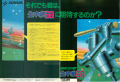
A two-page magazine ad for Namachuukei 68 in the August 1991 edition of Oh! X Magazine.
-
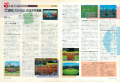
A two-page review for Namachuukei 68 in the September 1991 edition of Oh! X Magazine.


Music
As of the time of writing, if you search Google for “Namachuukei 68,” several of the top results will go to a popular YouTube channel of video game music edits called SilvaGunner. This channel edits video game music, usually changing the melody to match some other popular song. This is just to let you know that Sean Kingston did not steal the melody for “Beautiful Girls” from a Japanese computer game.
The actual game’s soundtrack was composed by Yuji Takenouchi, better known now as a sound designer for Demon’s Souls, Dark Souls, and Dark Souls II. He keeps a list of the games he’s worked on here.
How to Play Today
This game only runs on a deluxe vintage Japan-only computer, so getting a real copy of the game running on real hardware will cost you thousands of dollars. Thankfully the system is emulated well and compared to other computer emulators is unusually user-friendly to get a game actually loaded and running.
There is a RetroArch core for the X68000. To play the game, load Namachuukei 68’s A disc in the FDD0 slot and the B disc in the FDD1 slot after launching the core in RetroArch. Alternatively, there are a few standalone emulators for current PCs. The one with the best English-language documentation is XM6 Pro-68k. Again the process is unusually straightforward for a computer emulator: Just load the A and B discs in your two floppy drives then restart your emulated computer and it will launch.
Controls
Namachuukei 68 is controlled with a joystick and two buttons. The instruction manual and controls placard call these buttons A and B, although the official X1 Pad for the Sharp X68000 called the buttons I and II. I’ll call them A and B here.
Hitting
Use the joystick to aim your swing reticle in the zone at the incoming pitch. Press A to swing. Double-tap A to square to bunt.
Press B plus the direction of the target base to steal. Steals trigger immediately, so you have to time your jump.
Running
While the ball is in play, use B plus a direction to advance to a base. Use A plus a direction to retreat to that base. Frustratingly, the base directions depend on your camera angle.
From the center field camera: Left is first base, Down is second base, Right is third base, and Up is home.
From the right field camera: Left is home, Down is first base, Right is second base, and Up is third base.
From the left field camera: Left is second base, Down is third base, Right is home, and Up is first base.
Pitching
Hold a direction to choose a pitch then press A once for a normal speed pitch or twice for a slower pitch. After the windup, use the control stick to aim your pitch.
These are the directions for each pitch type, for a right-handed pitcher:
Up-Left, Up, Up-Right: Fastball
Left: Slider
Right: Shuuto
Down-Left: Curve
Down: Forkball
Down-Right: Sinker
Left-right directions are reversed for lefty pitchers.
Press B plus a direction for a pickoff throw. B+Left for a pickoff at first base, Down for a pickoff at second, or Right for third base.
Fielding
Without the ball: move the control stick to control the fielder with an orange cursor over them. Press A plus a direction to dive for the ball.
With the ball: Moving the control stick moves a blue cursor to select a base. Press A to throw to the selected base or B to run to the selected base.
